Everything you need to see the play
See touches
Player taps overlaid right on the gameplay video — see exactly what they did, tapped, or missed.
Record on event
Trigger capture from any event. Debugging Level 5? Fire StartLevel5 and record from that moment on.
Privacy first
Only the game window is captured. No system UI, no notifications, no personal data — GDPR & COPPA in mind.
Zero gameplay impact
Dynamic quality scaling adapts in real time. Tested under 1.5GB RAM with zero measurable impact.
Every platform
iOS, Android, Amazon and Unity supported out of the box. Over 11,000 device models seen in testing.
Tag & connect
Tag issues in the video — automatically via the SDK or by hand — and trace patterns across devices and regions.
Built for developers, frame by frame
See Touches
IV Metrics overlays player touches right on the video — so you can see exactly what they did. Are they tapping a button that’s unresponsive? Swiping a menu that won’t move? Hammering the X but just missing? Now you’ll know.
Instant Results
Stop guessing — start seeing. Not sure why players drop off during onboarding? Missing the close button? Failing a level over and over? Skip the three-hour meetings full of “educated” guesses and get answers from day one.
Record Only What You Want
Use our flexible event system to start recordings exactly when you need them. Troubleshooting Level 5? Trigger a StartLevel5 event and begin capturing from that moment onward — no extra footage, no wasted data.
No Permissions Required
No system permissions. No scary pop-ups. IV Metrics only captures your game, so there’s no need for screen recording permissions or access to personal data. Players stay focused. You stay compliant.
iOS / Android / Amazon / Unity
IV Metrics supports all major platforms right out of the box. Need something else? Get in touch — there’s a good chance we’re already working on it.
Variable Quality
Need to see what’s going on for low-end devices but don’t want to impact them? Scale capture quality up and down per device type so players aren’t affected, while you still get the detail you need.
Give Players a Choice
Let players opt in to video recording. Whether you’re tracking a tricky bug or inviting community feedback, IV Metrics includes a built-in pop-up you can show before recording — or use your own custom prompt.
Capture FPS & Memory Usage
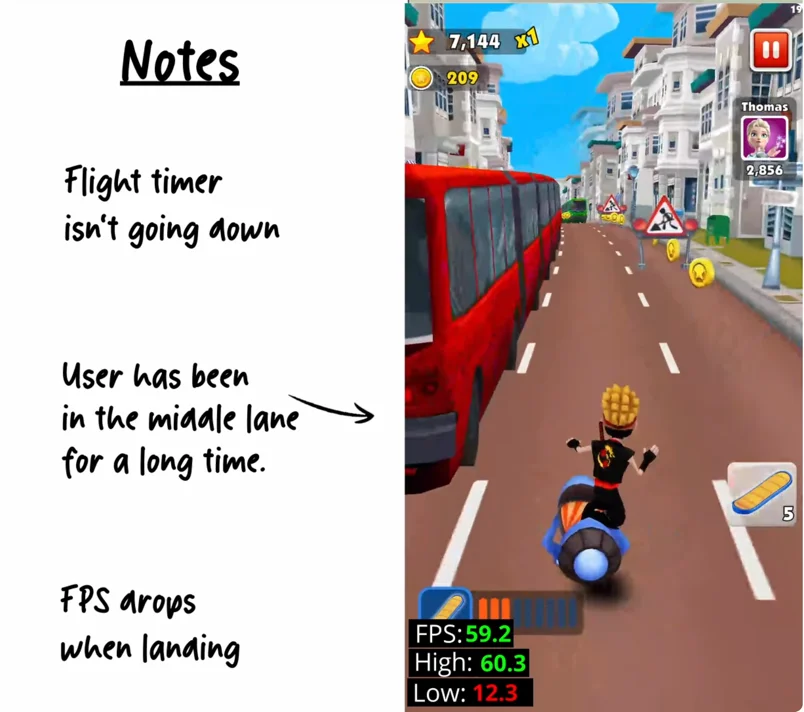
It’s one thing to know your game is lagging — it’s another to see it happening. Watch FPS drop, memory spike and lag set in, all in context with the video. By default we won’t record on struggling devices, but you can override it to chase a tricky bug.
We only capture what matters: your game.
IV Metrics never records the full device screen — just the gameplay window. No notifications, no pop-ups, no system UI, no ads.
Build with GDPR and COPPA compliance in mind. More insight, less risk.
Frequently asked questions
How is IV Metrics different from analytics tools?
Analytics tools tell you what happened in aggregate — installs, funnels, retention curves. IV Metrics shows you why, by recording the actual gameplay behind those numbers: real video with touch overlays and device metrics from real players.
Does IV Metrics affect game performance?
No. Video quality scales dynamically per device, and IV Metrics profiles over 11,000 device models to decide when not to record — so phones that can’t spare the headroom are left alone. It’s been tested on budget devices under 1.5GB of RAM with zero measurable impact on gameplay.
Which platforms and engines does it support?
One lightweight SDK covers iOS, Android, Amazon and Unity out of the box. It records the actual rendered game window rather than reconstructing your UI, so engine-rendered gameplay is captured as real video.
Does IV Metrics collect personal data?
No. Only the game window is captured — no system UI, no notifications, and no IP addresses, device identifiers or fingerprinting. It’s built with GDPR and COPPA in mind, so there are no consent banners to manage.
What exactly does it capture?
Real gameplay video with player taps and swipes drawn on top, plus device metrics like FPS, RAM and model alongside the footage. You can record invisibly in the background or trigger capture from any in-game event, such as StartLevel5.
Is it free to start?
Yes. You can sign up and start recording on the free plan with one lightweight SDK — no credit card required.